The best keyboards for work balance a comfortable layout and useful controls with the connection options your desk needs. These picks include quiet wireless models for shared spaces and mechanical keyboards for people who value compact layouts or switch customization.
Quick Top Products
JLab JBuds Wireless Keyboard

- 95 soft-touch keys and a media knob offer quiet typing and quick audio controls.
- Switch among up to three device connections, including Bluetooth and a USB dongle.
- Rechargeable battery supports up to 30 days of wireless use.
Best For: Office workers who want quiet typing, a number pad, and wireless switching between devices.

JLab Epic Wireless Keyboard

- Its 108 full-size keys are backlit for low-light typing.
- A built-in smart media knob provides hands-on audio volume control.
- Connect up to three devices over Bluetooth 5.2, with a USB dongle option.
Best For: People who want a full-size backlit keyboard and media control for varied work hours.
JLab Go Wireless Keyboard
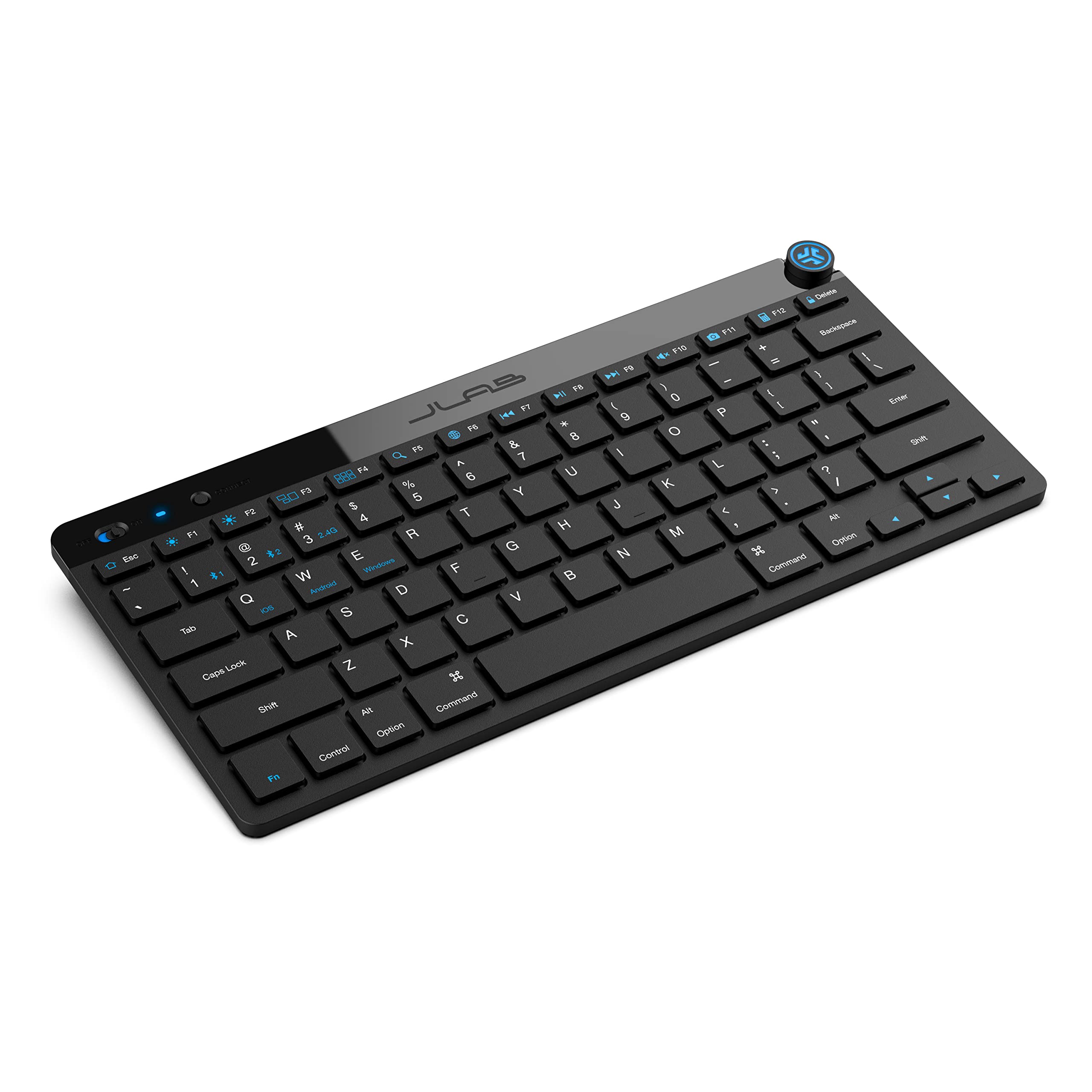
- The ultra-compact, low-profile design suits minimal workspaces.
- Bluetooth 5.0 and a USB dongle support up to three saved devices.
- This offer is a four-pack for team or classroom use.
Best For: Travelers and minimalist desk users who need a compact keyboard for several devices.
SOLAKAKA KI99 Pro Silent

- Silent switches and five noise-reducing layers are designed to reduce typing noise.
- Its 96% layout includes a control knob for volume, media, and brightness.
- Choose Bluetooth, 2.4G wireless, or Type-C connections.
Best For: Mechanical-keyboard users seeking a quieter, wireless layout with a number pad.
SOLAKAKA A75 75% Wireless Mechanical Keyboard, Hot Swappable Gaming Keyboard with Multifunction Knob & RGB, Gasket Mounted Creamy Keyboard, PBT Keycaps, Compact Layout for Win/Mac/PC
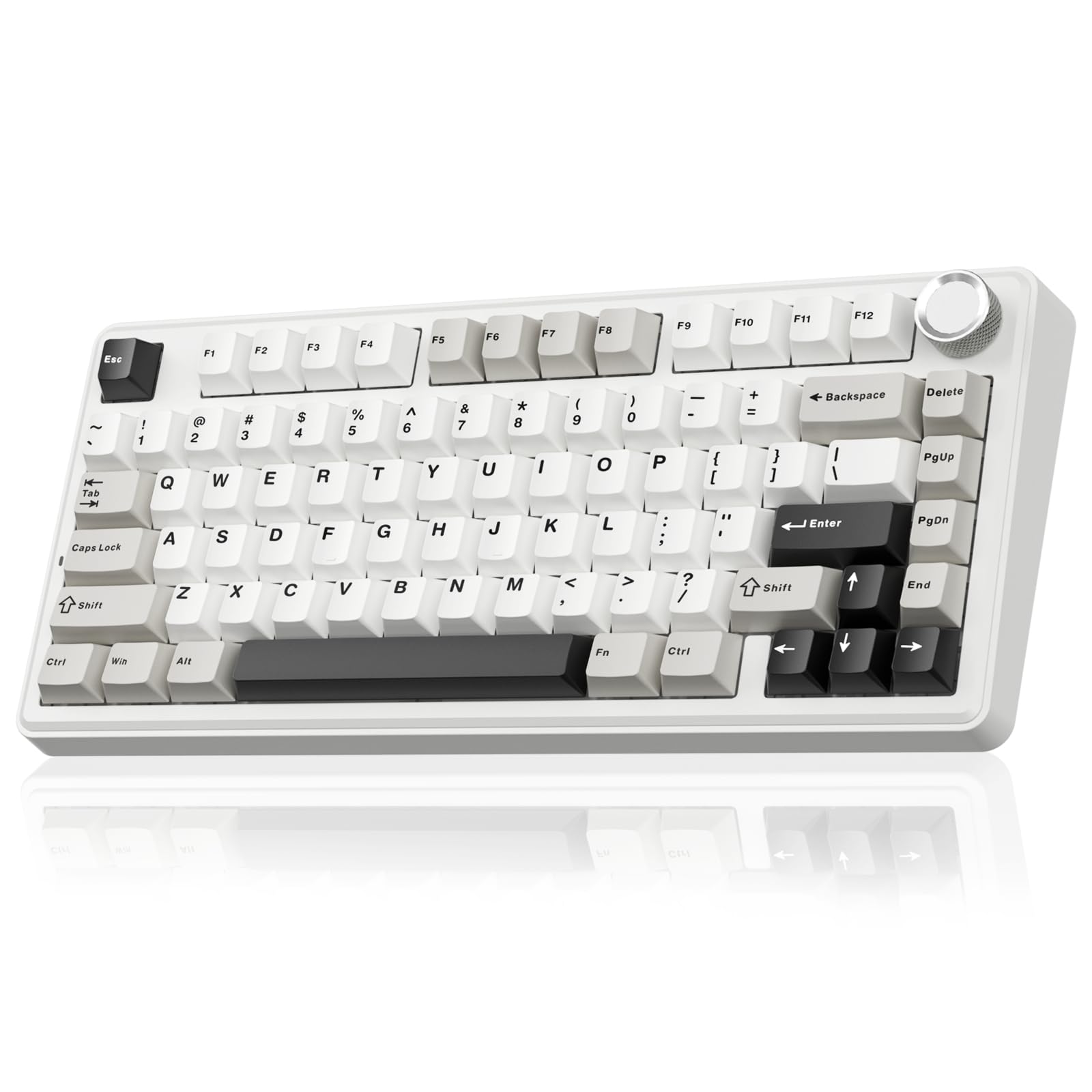
- The 81-key layout retains arrow keys in a compact footprint.
- PBT keycaps are designed to resist wear and fading.
- It supports 2.4GHz, Bluetooth 5.0, and USB-C connections.
Best For: Desk-space-conscious workers who want arrow keys, wireless options, and PBT keycaps.
SOLAKAKA KI99 Pro 96% Keyboard
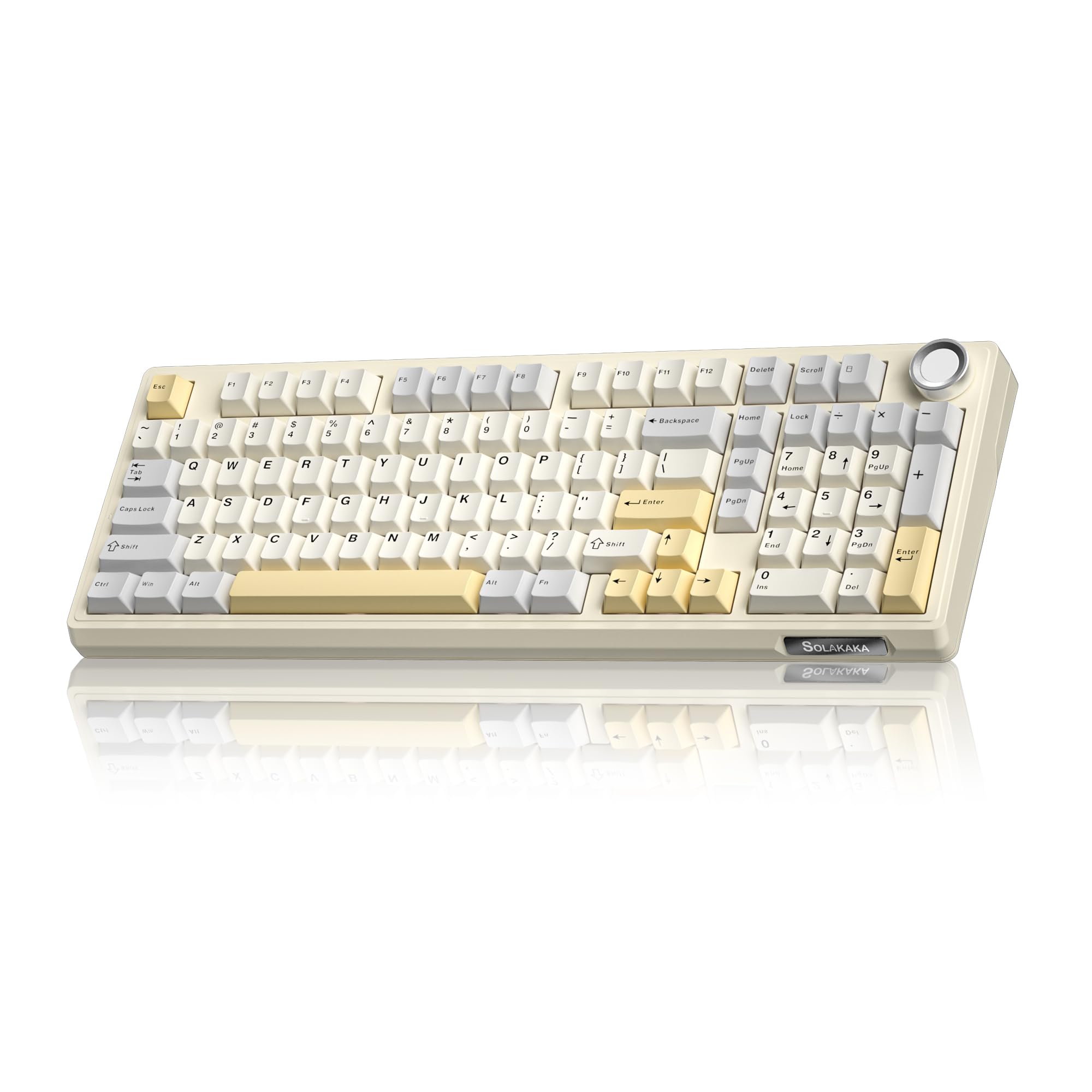
- The 96% layout includes a number pad while saving desk space.
- A multifunction knob adjusts volume, media, and lighting brightness.
- It supports Bluetooth, 2.4GHz wireless, and Type-C wired connections.
Best For: Workers who want a space-saving mechanical board that retains a number pad and allows switch changes.
SOLAKAKA A75 Wireless Gaming Keyboard with Multifunction Knob, BT5.0/2.4GHz/USB-C, 75% Mechanical Keyboard, Hot-Swappable, Gasket Creamy Keyboard with RGB Backlit, Crystal Keycaps, for PC/Mac/PC
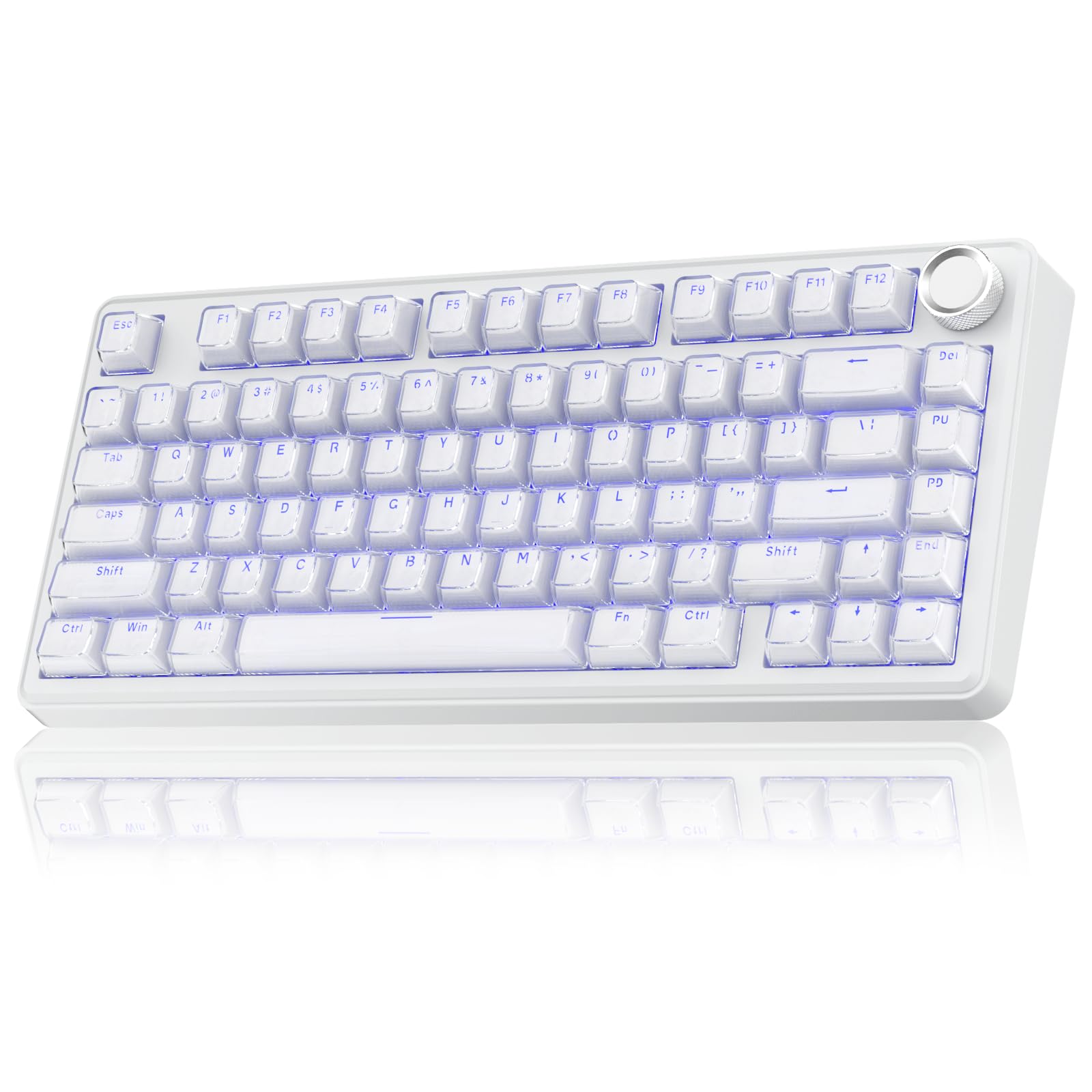
- The 81-key layout retains arrow keys in a 75% format.
- The knob controls lighting or office audio depending on its mode.
- It supports Bluetooth 5.0, 2.4GHz, and USB-C connectivity.
Best For: Workers who want a compact layout and a knob that changes between lighting and office audio controls.
SOLAKAKA A99 Pro Wireless Keyboard
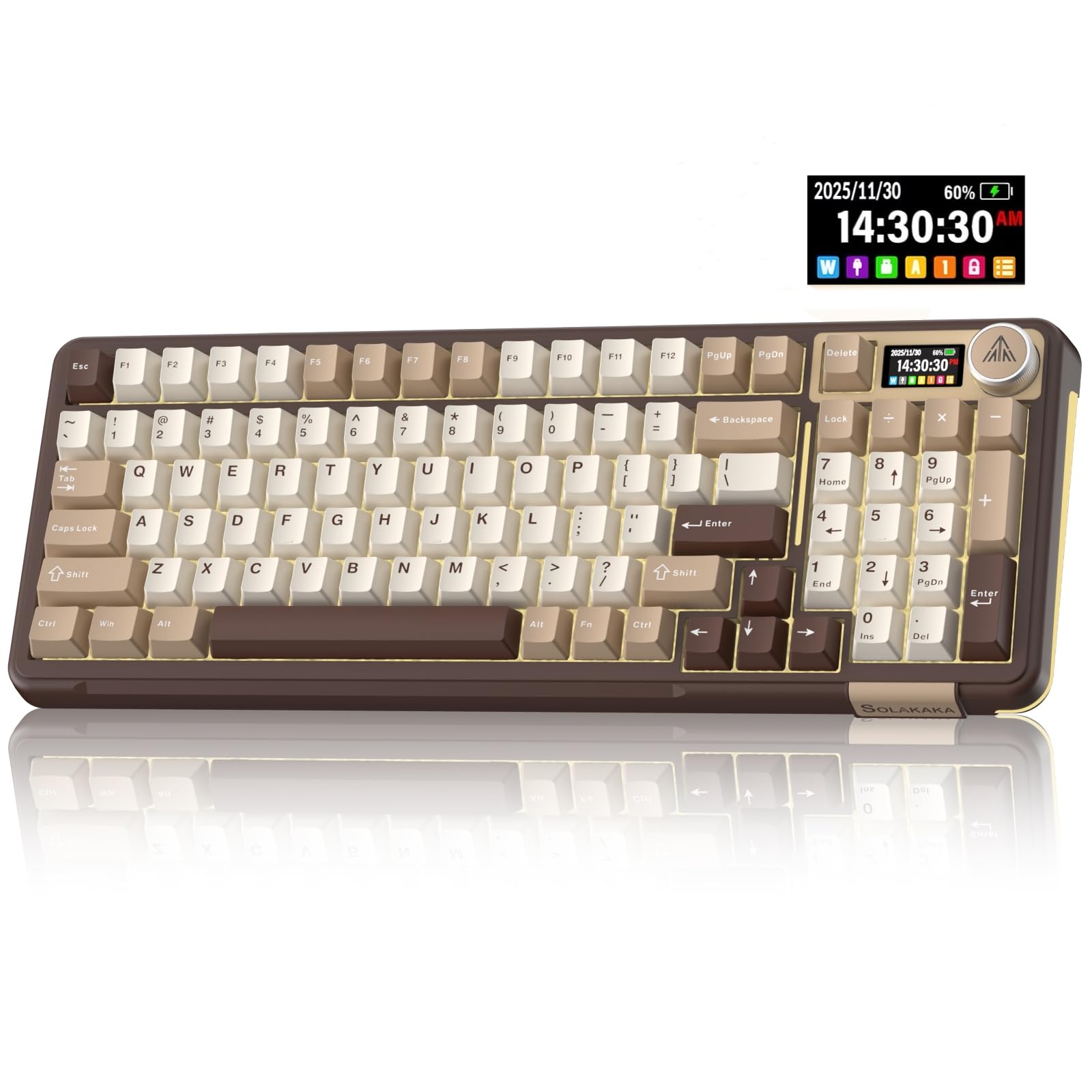
- The LCD shows time, battery level, system, and connection information.
- The knob controls functions such as volume, lighting, and settings.
- It supports Bluetooth, 2.4GHz wireless, and USB-C connections.
Best For: Workers who want a configurable wireless mechanical keyboard with an information screen and multi-device support.
Quiet Wireless With Number Pad
JLab JBuds Wireless Keyboard, 95 Key, Multi-Device Bluetooth and USB dongle, Soft Touch Keys, Media knob, Custom Profiles, Black
The JLab JBuds pairs a 95-key layout with soft-touch keys and a dedicated media knob, giving routine office work quick volume and playback controls. Its full numerical pad is useful for spreadsheet entry, while the slim design takes less room than a conventional full-size board.
You can switch among three connections, including two Bluetooth links and a USB wireless dongle, and the rechargeable battery is rated for up to 30 days of wireless use. It suits multi-device desks and quieter shared workspaces.
Check whether the 95-key layout includes every key you rely on before replacing a full-size keyboard.
Best For: Office workers who want quiet typing, a number pad, and wireless switching between devices.
| Pros | Cons |
|---|---|
|
|
Choose the JBuds if your work involves number entry, device switching, and quiet typing in a shared room. Its 95-key layout retains a numerical pad while keeping the board slim, but the records do not establish that it has a conventional full-size layout or adjustable backlighting.
Confirm the key arrangement against your shortcut habits. The wireless setup supports Bluetooth and a USB dongle, so check which connection best fits the computers and tablets you use.
Backlit Full-Size Wireless Workstation
JLab, Epic, Wireless Keyboard, Bluetooth 5.2, USB Dongle, Multi-Device, Backlit, 108 Keys, Black
The JLab Epic is a full-size wireless keyboard with 108 backlit keys, soft-touch typing, and a smart media knob. That combination suits long desk sessions where you want a number pad, visible legends in dim light, and quick audio adjustments without reaching for software controls.
It connects to as many as three devices over Bluetooth 5.2 and also supports a USB wireless dongle. A 2,000 mAh rechargeable battery powers it, and the notes give a two-year JLab warranty.
Check the backlight adjustment options and battery expectations for your lighting habits before buying.
Best For: People who want a full-size backlit keyboard and media control for varied work hours.
| Pros | Cons |
|---|---|
|
|
Pick the Epic if a number pad and illuminated full-size key layout matter more than minimizing desk footprint. It adds a media knob and multi-device connections, with a rechargeable battery and stated two-year warranty.
The supplied details give battery capacity but no runtime, so factor charging access into a wireless setup. Its soft-touch keys are described as quiet, though the exact sound level and backlight controls are not specified.
Compact Keyboard for Shared Desks
JLab Go Wireless Keyboard, Bluetooth and USB dongle, Multi-Device, Compact, Black (4 Pack)
The JLab Go is built around an ultra-compact, low-profile layout designed to keep a workspace uncluttered. Its quiet typing feel and lightweight construction make it a practical fit for a home office, shared desk, or travel bag.
Bluetooth 5.0 and a USB wireless dongle give it two connection routes, and it can save up to three device connections across Windows, macOS, iOS, Android, and Chrome OS. This offer is a four-pack, which may suit a team or several workstations but is more than most single-keyboard buyers need.
Confirm the compact layout has the keys required for your daily shortcuts.
Best For: Travelers and minimalist desk users who need a compact keyboard for several devices.
| Pros | Cons |
|---|---|
|
|
This is the most suitable option here for a shared workspace, classroom, or person who wants a travel-friendly keyboard and can use multiple units. The four-pack is the main purchasing consideration for an individual.
Its compact layout saves space, but the supplied details do not explain the complete key arrangement or confirm a number pad. Review the layout and pack quantity before choosing it for spreadsheet-heavy work.
Quiet Mechanical Typing With Number Pad
SOLAKAKA KI99 Pro Wireless Mechanical Keyboard with Quiet Switch, Hot Swappable Pre-Lubed Switches with RGB Backlit, Gasket Structure Computer Gaming Keyboard (BlackBlue, Silent Switch)
The KI99 Pro Silent combines a compact 96% layout with a number pad, a control knob, and silent switches. Its gasket structure and five noise-reducing layers are designed to reduce typing noise, making it a more office-oriented choice among the mechanical options here.
It connects over Bluetooth 5.0, 2.4G wireless, or Type-C, and the 10,000mAh battery is intended to reduce charging frequency. Hot-swappable keys let owners change compatible switches without soldering.
The quiet switch configuration is the key distinction; check how its tactile feel and software fit your preferences before buying.
Best For: Mechanical-keyboard users seeking a quieter, wireless layout with a number pad.
| Pros | Cons |
|---|---|
|
|
Choose this KI99 Pro if you want mechanical switch customization but need a quieter configuration and a number pad for office tasks. Its 96% layout and knob preserve common controls, while tri-mode connections allow wired or wireless use.
The stated 10,000mAh capacity does not establish real-world runtime, so plan around charging availability. Check the included silent switch feel and compatibility before treating hot-swap support as a guarantee that any switch will suit your typing.
Compact Layout With PBT Keycaps
SOLAKAKA A75 75% Wireless Mechanical Keyboard, Hot Swappable Gaming Keyboard with Multifunction Knob & RGB, Gasket Mounted Creamy Keyboard, PBT Keycaps, Compact Layout for Win/Mac/PC
The SOLAKAKA A75 uses an 81-key, 75% layout that keeps arrow keys while reducing the board's footprint. It also includes a multifunction knob that changes role between gaming and office modes, controlling lighting in one mode and volume in the other.
The keyboard connects over 2.4GHz, Bluetooth 5.0, or USB-C and supports up to five devices. PBT keycaps and hot-swappable switches appeal to people who want to customize their typing setup.
Its compact layout omits many keys found on full-size boards, so check whether you need a number pad or dedicated navigation keys.
Best For: Desk-space-conscious workers who want arrow keys, wireless options, and PBT keycaps.
| Pros | Cons |
|---|---|
|
|
Pick the A75 if desk space and switch customization matter more than a numeric keypad. The 81-key layout retains arrows, and the office-mode knob offers volume control alongside three connection types.
PBT keycaps are another practical distinction from variants that do not identify their keycap material. The 4,000mAh battery capacity is given without a runtime estimate.
Check that the reduced key count suits your spreadsheet and navigation work.
96% Layout With Custom Switches
SOLAKAKA KI99 Pro 96% Wireless Gaming Keyboard, RGB Creamy Keyboardw with Knob, Hot-Swappable Pre-Lubed Switches, Gasket Structure Mechanical Keyboards (Beige-White, Non-Silent Version)
The KI99 Pro has a 96% layout that retains most full-size functions, including a number pad, while taking less desk space. A knob handles volume, media playback, or lighting brightness, and the keyboard connects through Bluetooth 5.0, 2.4GHz wireless, or Type-C.
Its gasket construction uses five noise-reducing layers, and hot-swap support allows 3-pin or 5-pin switch replacement without soldering. This version is identified as non-silent, so it is better suited to people who prefer a more audible mechanical feel than those prioritizing a quiet shared office.
Check the exact included switch feel before settling on it.
Best For: Workers who want a space-saving mechanical board that retains a number pad and allows switch changes.
| Pros | Cons |
|---|---|
|
|
This KI99 Pro fits work that benefits from a number pad and a customizable mechanical board, particularly if a non-silent switch feel is acceptable. Its 96% layout integrates most functional keys of a traditional full-size keyboard while saving desk space.
The wireless and wired options cover different desk setups. The non-silent version may be a poor fit for quiet shared offices.
Consider the silent KI99 configuration if noise reduction is a priority, and check runtime details before relying on wireless use all day.
75% Layout With Dual-Mode Knob
SOLAKAKA A75 Wireless Gaming Keyboard with Multifunction Knob, BT5.0/2.4GHz/USB-C, 75% Mechanical Keyboard, Hot-Swappable, Gasket Creamy Keyboard with RGB Backlit, Crystal Keycaps, for PC/Mac/PC
This SOLAKAKA A75 is an 81-key, 75% keyboard with a multifunction knob that switches between gaming and office modes. In office mode, the knob controls volume and its press mutes or unmutes; in gaming mode it adjusts lighting.
It connects through Bluetooth 5.0, 2.4GHz wireless, or USB-C and supports up to five devices. The 4,000mAh battery is a stated capacity, but no runtime is provided.
Its crystal keycaps use a transparent outer shell and an ABS inner layer, a distinctive look that may not suit buyers seeking a conventional understated office board.
Best For: Workers who want a compact layout and a knob that changes between lighting and office audio controls.
| Pros | Cons |
|---|---|
|
|
Choose this A75 if its crystal keycap style appeals and you want a compact board with a useful office-mode volume knob. It retains arrows but has no documented number pad, and its 4,000mAh battery capacity is not paired with a runtime figure.
Its tri-mode connections and five-device support suit a changing desk setup. Check the keycap look, software compatibility, and reduced key layout against your work before buying.
Screen and Knob for Workflow Controls
SOLAKAKA A99 Pro Mechanical Keyboard with LCD Screen & Metal Knob, Wireless Gaming Keyboard with BT5.0/2.4GHz/USB-C, Hot Swappable Creamy Keyboard, Gasket Structure, RGB Backlit, for Win/Mac
The SOLAKAKA A99 Pro adds an LCD screen and metal knob to a wireless mechanical keyboard. Its screen can show date, time, battery level, connected system, and connection mode, while the knob handles volume, lighting, and other settings.
The board supports Bluetooth 5.0, 2.4GHz wireless, and USB-C, and can save up to five devices. Hot-swappable switches, a gasket structure, and five cushioning layers make it customizable with a typing feel intended to be soft and damped.
The supplied details do not identify its key count or layout, so verify that it has the keys and number pad your work requires.
Best For: Workers who want a configurable wireless mechanical keyboard with an information screen and multi-device support.
| Pros | Cons |
|---|---|
|
|
Pick the A99 Pro if an on-board status screen and broad connection options are valuable in your workflow. Its controls and five-device support suit people switching among computers or mobile devices, while hot-swap support offers room to change the typing feel.
The main buying unknown is layout: the supplied details do not say whether it includes a number pad or how many keys it has. Confirm that detail and battery expectations before choosing it as a daily office keyboard.
How to Choose Keyboards For Work
How We Picked Best Keyboards for Work
We prioritized practical office details that the candidates actually share: layout, typing noise, useful controls, wired or wireless connections, and multi-device support. Quiet soft-touch options like the JLab JBuds are suited to shared rooms, while the full-size JLab Epic adds backlighting and a 108-key layout.
Mechanical boards earned a place when they offered a clear work benefit, such as a number pad, hot-swap customization, or a mode-switching volume knob.
We also considered whether the product offer fits an individual or an organization. A four-pack compact keyboard and a 16-pack JBuds offer have different buying implications from one keyboard.
Gaming features alone did not make a model a leading work pick; compact size, quiet typing, media controls, and connection flexibility were more useful distinctions for this category.
Comparing Keyboards for Work
Start with the layout you use every day. The JLab JBuds and SOLAKAKA KI99 Pro 96% retain a number pad, while the A75 models use 81 keys and retain arrow keys without a dedicated number pad.
The Epic offers 108 full-size backlit keys. A compact keyboard can free desk space, but frequent spreadsheet entry may favor a board with a numeric section.
Typing sound separates the softer office options from mechanical choices. JLab's soft-touch keys are described as quiet, and the KI99 silent version pairs silent switches with noise-reducing layers.
The KI99 non-silent version and several customizable mechanical boards may appeal to users who prefer a more pronounced typing feel. Check switch configuration and work setting before deciding.
Connection flexibility also varies. JLab boards offer Bluetooth and a USB dongle, while selected SOLAKAKA models add USB-C wired mode and support multiple saved devices.
Look at device compatibility and any software restriction: one A75's programmable driver works only on Windows in wired mode. The coordinator inserts a feature comparison table here.
| Product | Standout features | Best for |
|---|---|---|
| JLab JBuds Wireless KeyboardCheck Price |
| Office workers who want quiet typing, a number pad, and wireless switching between devices. |
| JLab Epic Wireless KeyboardCheck Price |
| People who want a full-size backlit keyboard and media control for varied work hours. |
| JLab Go Wireless KeyboardCheck Price |
| Travelers and minimalist desk users who need a compact keyboard for several devices. |
| SOLAKAKA KI99 Pro SilentCheck Price |
| Mechanical-keyboard users seeking a quieter, wireless layout with a number pad. |
| SOLAKAKA A75 75% Wireless Mechanical Keyboard, Hot Swappable Gaming Keyboard with Multifunction Knob & RGB, Gasket Mounted Creamy Keyboard, PBT Keycaps, Compact Layout for Win/Mac/PCCheck Price |
| Desk-space-conscious workers who want arrow keys, wireless options, and PBT keycaps. |
| SOLAKAKA KI99 Pro 96% KeyboardCheck Price |
| Workers who want a space-saving mechanical board that retains a number pad and allows switch changes. |
| SOLAKAKA A75 Wireless Gaming Keyboard with Multifunction Knob, BT5.0/2.4GHz/USB-C, 75% Mechanical Keyboard, Hot-Swappable, Gasket Creamy Keyboard with RGB Backlit, Crystal Keycaps, for PC/Mac/PCCheck Price |
| Workers who want a compact layout and a knob that changes between lighting and office audio controls. |
| SOLAKAKA A99 Pro Wireless KeyboardCheck Price |
| Workers who want a configurable wireless mechanical keyboard with an information screen and multi-device support. |
Choosing a Quiet Office Keyboard or Mechanical Board
For shared spaces, prioritize documented quiet typing features and convenient audio controls. The JBuds pairs soft-touch keys with a media knob, while the KI99 Silent combines silent switches with five noise-reducing layers.
These are different approaches: one emphasizes a slim wireless office layout, the other keeps mechanical hot-swap capability and a number pad.
For a customizable mechanical keyboard for work, decide whether a compact layout is enough. The A75's 81 keys retain arrows, while the KI99's 96% layout keeps a number pad.
Hot-swap compatibility can let you change switches later, but it does not answer which switch feel or sound will suit your desk. Verify the selected version and layout details before ordering.
Who Should Buy Which Work Keyboard?
Choose the JLab JBuds for a quiet, slim wireless setup with a number pad and device switching. The Epic fits buyers who want a full-size backlit layout and media knob.
For travel or outfitting several workstations, the JLab Go is compact, but its four-pack quantity suits group use better than a single desk.
Choose a SOLAKAKA KI99 Silent if you want a mechanical board with a number pad and noise-reduction features. An A75 suits a smaller desk where arrow keys matter more than a number pad, and its knob provides office audio controls.
The A99 Pro adds an LCD screen and multi-device options, but check its key layout and runtime details first. Match the purchase to the keys, sound, connection method, and pack quantity your workday calls for.